
The notification bell
What shows up under the bell in the top bar, and how to mark things read.
The bell in the top bar collects what's happened in your studio lately. A number on the bell shows how many you haven't read yet.
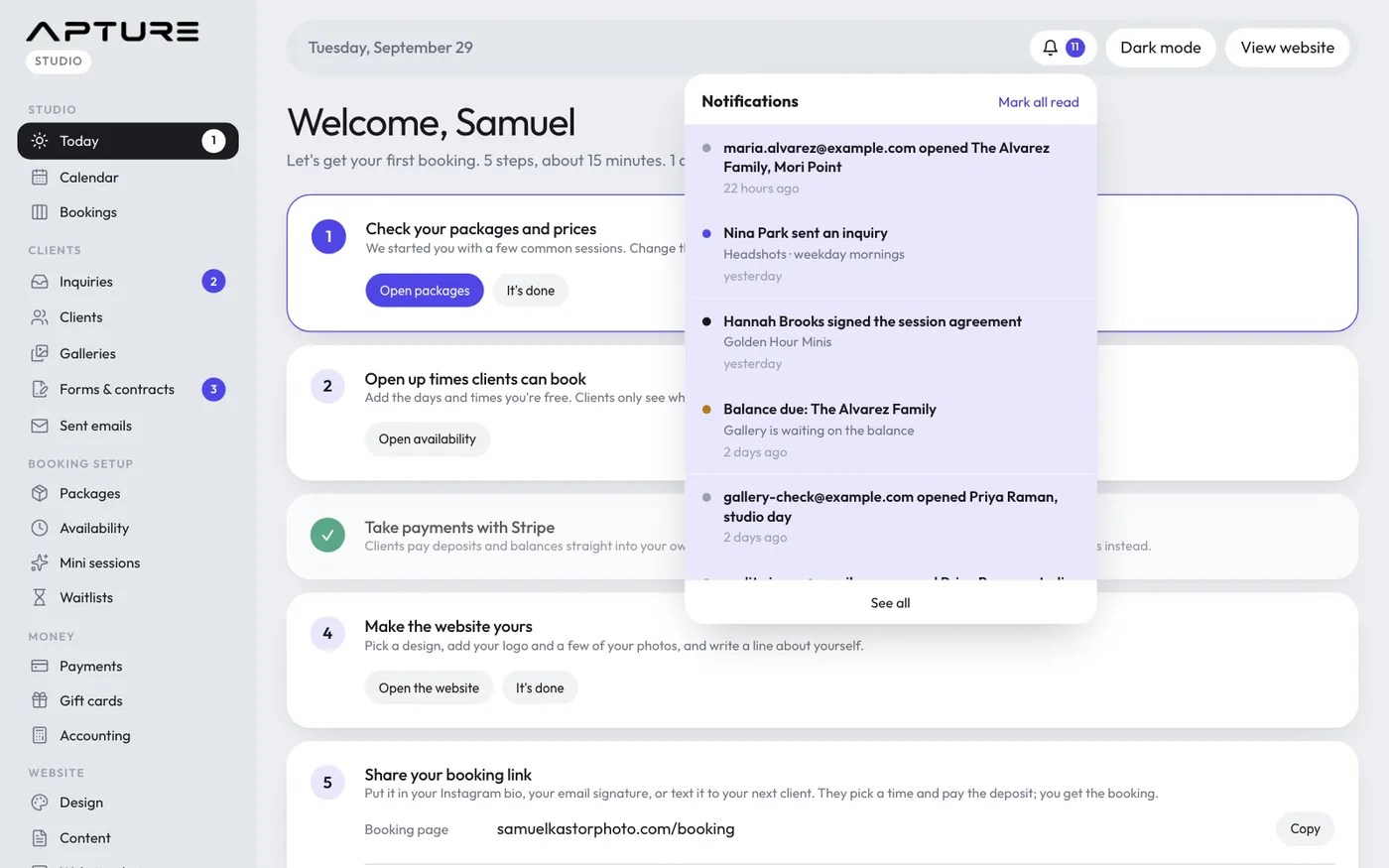
What you'll be told about
- New inquiries
- Website signups from your website popup
- New bookings
- Payments
- Signed contracts and completed forms
- Gallery activity
- Balances due
- Waitlist activity
- Your Apture plan and storage
- Calendar sync problems, such as Google asking you to reconnect
Using the bell
- Click the bell to open the list of recent notifications.
- Click one to go straight to the page it's about. It's marked read.
- Click Mark all read to clear the count.
- Click See all to open the full Notifications page.
The Notifications page lists everything from the last 90 days, and also has a Mark all read button. Older notifications are removed automatically.
Everyone has their own read state
Notifications are for the whole studio, but each team member reads them separately. Marking something read only clears it for you.
A Shooter doesn't see the bell.
Emails too
The bell is only inside the admin. To get studio notifications by email, and a daily digest of follow-ups due, upcoming sessions and unsigned contracts, go to Account > Settings and open the Notifications tab.
Still have a question? support@aptureapp.com